Showing posts with label Lean. Show all posts

Wednesday, March 16, 2011

Operational Excellence doesn’t have to be an Either-Or Decision

Six Sigma vs. Lean; Shingo Prize vs. Malcolm Baldrige

Operational excellence programs are not an island among themselvesLean, Six Sigma, and other methodologies and programs are great, but none of them solve all the problems all organizations experience. As an example, Lean doesn’t solve difficult scientific problems with complex interactions. I am a Lean practitioner and certified Six Sigma Black Belt and have used both of them to solve difficult problems, but I don’t wedge my experience with either into every situation or issue I encounter.

Possibly organizations could be better served by the technical community if instead of focusing on a single cookie cutter strategy for improvement for the entire enterprise, they used the one(s) or a blend that best matched their needs, current conditions, and vision for the future. All environments, cultures, and challenges are unique, why should we expect a “one size fits all” program to be the silver bullet?

Monday, December 20, 2010

What is your Ultimate Professional Subscription?

swiss-army-knifeIf they offered a 12 month subscription to any or all the tools to equip you to be the best in your profession, what would it include?

Technology

I recently won a contest where the prize was a one year Visual Studio 2010 Ultimate with MSDN subscription. For a person that develops solutions using Microsoft technologies, there is no better prize. It is the Swiss Army knife of Microsoft Development. 

Here’s how I described the prize to my sister in terms she would relate to:

Construction

My brother-in-law is a  general contractor who does a lot of custom construction. He is constantly buying some new piece of equipment that he doesn’t have, but “needs” for this special job. If he had a Construction Equipment Ultimate Subscription, it would mean every time he needed a special tool like a spindle lathe, a vinyl siding cutter, or even a Bobcat, he would just take his subscription card to the local construction equipment store and redeem it for whatever non-perishable supply, machine, or equipment he needed that year.

The concept is really pretty Lean; get what you need, when you need it, in the form you want it.

Leave a comment to let me know what your Ultimate subscription would be.


photo credit: Jesse Sneed / CC BY-ND 2.0

Tuesday, September 21, 2010

Three Tactics to Keep Project Activities Moving

electronic personal kanban

Regardless of the Project Management system, activities sometimes sit in the queue or in-process for extended periods of time. A few keys to keeping tasks moving to accelerate accomplishment are:

  • Break up larger activities into smaller subtasks. For example: break “resolve content management system issue” into “investigate CMS issue”, “identify possible fix”, “apply fix”, “verify the problem is resolved”.
  • Make the system more visible. The advantage of whiteboard systems is they are in line of sight more than electronic systems that are multiple clicks away. What gets watched often gets improved. The down side of physical systems, is they may not be portable and visible from other locations or by other people at a distance.
  • Collaborate with or solicit help from other people with more expertise or knowledge about the subject matter. Often technical people feel they are responsible for resolving issues themselves. Don’t be an Answer-Man Super Hero.

Lean Project Management is a comprehensive methodology based on Lean principles to minimize Work in Process (WIP) while maximizing valuable project completion.

There are a variety of tools that can help facilitate a Lean Project Management process. You can use spreadsheets, databases, Personal Kanban white boards, or any of the commercial or open source software based systems. Recently I have been experimenting with flow.io because of its simplicity. Cautionary note: Lean Project Management is about much more than a tool or software product.

No Lean system or process is perfect right out of the box. It is important to start simple and jump in and start learning your way to a system that meets your needs and the needs of your stakeholders.

Tuesday, May 11, 2010

Right-sizing the Vacuum – a Lean Machine

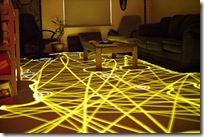
roomba time-lapse trail

Floors and carpets don’t wait to get dirty until the day you vacuum. They accumulate dirt, lint, and other debris every day at a reasonably constant rate. If you ran the vacuum daily the vacuum wouldn’t need to be as powerful or have a reservoir that holds a gallon of gunk.

But who has the time to vacuum every day? If the sweeping was automated by using a device like the Roomba, daily cleaning can become a reality.

Examples of Lean can be found in the most unusual places, like cleaning machines and processes.

5S Concepts

  • keep the most frequently used tools closest to the work
  • keep the area clean and free of slip and trip hazards – frequent sweeping and keeping wires and trip hazards off the floor
  • everything has a place – the charging station is like a shadow board

Lean Concepts

  • Quick changeover – traditional vacuums tend to be heavy and take up space so they are often put away in a closet or laundry room and require dragging out and winding/unwinding of long cords; smaller size can get in tight spaces without using optional attachments or moving furniture
  • right-sizing: enclosure, motor, debris reservoir, power source (battery) sized for the more frequent, but lighter workload
  • poka yoke – sensors to protect from injuring pets and children, tumbling off the stairs; virtual walls to restrict the cleaning area; works in the dark; dirt sensing; auto-charging of the battery
  • standardized work – Roomba follows a navigational algorithm; standard method to determine the necessity of special spot cleaning mode; some models have automatic schedulers
  • no defects passed to upstream processes – special spot cleaning mode enabled immediately when excessive dirt is detected

If the floors are vacuumed/swept daily, there is no worry about dust bunnies when a friend or neighbor stops by unannounced.

As the path highlighted in the above image shows, the Roomba might not be as efficient in the travelling path as a human operator, but the important thing is that all the surfaces are effortlessly covered at an acceptable quality within the Takt time.

Automated vacuum robots are not for everyone or everywhere, but they present a compelling argument for consideration. If nothing else, it might give you an excuse to justify buying that nifty robot you’ve had your eyes on.

Automated robots are gaining in popularity for other tasks as well:

  • mopping
  • garage sweeping
  • gutter cleaning
  • lawn mowing

Additional Benefit

They can keep the family pet company while you’re away.

Where do you see other interesting or unconventional examples of Lean concepts being applied? Comments welcome.

Disclaimer: I don’t own any iRobot products or receive any financial or other benefits from them.

Photo attribution

http://www.flickr.com/photos/13963375@N00 / CC BY-SA 2.0

Friday, April 16, 2010

Personal Kanban – More Done, Less Stress

Personal Kanban whiteboard

Life used to be simple:

  1. Get up
  2. Go to school/work
  3. Relax
  4. Go to bed

It didn’t require much planning for effective time management. As a result of the increasing hustle and bustle of our society or just the result of getting older (which I’m not ready to admit yet), increasing responsibilities and extra-curricular activities place demands on our time.

  • little league
  • professional associations
  • school functions
  • home maintenance
  • [insert your challenges here]

That is where a personal Kanban can help us work smarter and reduce our stress level by knowing we have a handle on our activities.

Anyone can do it

You can use a simple whiteboard (or even a sliding glass door) to help manage your time and activities visually and efficiently with a simple system of sticky notes in columns labeled similar to the following:

  • to do
  • in process
  • done
  • I find “awaiting decision” or some variation helpful also

How To

Jim Benson has a great Personal Kanban presentation that introduces, in detail, how you can improve your personal productivity using a personal kanban.

Home and Office

The process works equally well at the office for work activities/projects and at home. I use 24” X 36” whiteboards (Sam’s Club - $15) which has enough space for two types of projects being managed with separate spaces for each - and a little area left over for impromptu notes and sketches.

Addicting

If you are like me, once you try it out and realize the power of them, you start using them for everything... and try to convince everyone around you to use them also.

Friday, October 23, 2009

Problems with off-the-shelf Lean Learning Tools

Creating Lean learning tools for a mass public almost goes against the principles of learning through development. It is very difficult to find the simplest starting point for a learning tool that is applicable to the widest audience. The best learning tools break the concept down to the simplest form in the context that it will be applied - and using local terminology. No two organizations are alike so the conditions are always going to be different. For this reason, the learning experience will not reach its full potential with off-the-shelf learning tools.

PacingScreens

Production Pacing Indicator Example

Even a simple display, like the one above, of a target vs. actual production count with red/yellow/green color indicators raises numerous questions:

  • should pausing the elapsed time be allowed (like for during breaks and lunch)
  • if paused, should it recalculate target based on total running time only
  • should stopping automatically clear the display or retain it until restarted?
  • should the counts restart every hour or be cumulative?
  • what should be used as a target: pcs/hour, pcs/shift, pcs/day
  • should the target rate be fixed, or allow adjustment throughout the shift?
  • how often should the display update?
  • should the color change be based on mathematical rounding of the target/actual calculation?
  • Should it round up or down?
  • Should it display the actual percentage to target or just the colors?

As the participants surface these questions relative to the decisions that were made in creating the off-the-shelf tool, it will do two things:

  1. the participant’s learning or application of the learning may be inhibited by their experience with the tool and its “limitations”.
  2. participants may question the validity of the tool because they see more “problems” with it, than benefits.

Do any of the following sound familiar?

  • “It doesn’t do this…”
  • “It doesn’t do that…”
  • “It won’t work here, because…”
  • “How does it handle this situation?”
  • “Can you do that with it?”

Statements like those above distract the participants from the learning experience.

The best tools for learning are the ones that are created and customized specifically at the point of use, in collaboration with and for the participants engaged in the experience.

Friday, August 28, 2009

Blood Donation Delays Trickle Away with Lean Methods at Red Cross

While donating blood yesterday, A Red Cross administrator described a few ways they were implementing Lean methods to improve the donation process - for both the donors and the workers. Some highlights follow:

Big self-qualification poster at the entrance that can save a potential donor time waiting in line to sign-in and read the comprehensive qualification manual just to find out they can’t donate because they are on antibiotics, or travelled to Africa recently. About 12 common disqualifying reasons are listed.

Red Cross Name Tag Red or Green name tags indicated if the donor is a first time or repeat donor. That can sometimes be an indicator if they might have more questions or they may not be familiar with the process.

in-use Ready, In-use, and Open signals to indicate to the workers when the donor is done with the computerized screening questionnaire, or the screening area is occupied or ready for another donor.

Work area re-layout to minimize worker walking distances, but still maintain confidentiality.

The administrator I spoke with was very positive about the improvements which indicates she believed the methods would allow them to better serve the donors while making their jobs easier as well.

“In other areas where they have implemented these changes, they have trimmed 10 to 17 minutes off a
blood donor’s process.”

According to the August 2009 Central North Carolina Red Cross newsletter

I ended up waiting 45 minutes to get my blood drawn even with an appointment, so there is obviously room for improvement, but it was encouraging to see the progress. This was a mobile team so they have several other challenges to overcome that frequently slow or hinder progress:

  • every day they work with a different team of people coming from neighboring counties and states
  • they have to tear down and rebuild their work areas daily, sometimes multiple times per day
  • located in different venues with different floor plans, sizes, and entry/exit paths

Just knowing they are working on saving time for donors shows respect and makes me feel better about the Red Cross.